I can safely say I am seldom dumbfounded. But this morning I had to smile.
My wife: Have you Messenger sent your latest song over to me?
Me: No. Why?
My wife: You said you sent it to K (our daughter) on Messenger yesterday.
Me: That was an older one from a few days ago. You ‘liked’ it on Facebook so I thought you’d heard it already.
I then play her the Messenger sent song on my daughter’s site.
My wife: Ah okay. It’s amazing what that music system can do isn’t it.
Me: Yes. Brilliant. But I still have to play the guitars, keyboards and sing.
My wife: You can’t play keyboards.
Me: What! It doesn’t do it for me! It may be one note stuff. But it’s me playing.
My wife: Oh!
I am now wondering if she possibly thought the new Apple GarageBand system is an Artificial Intelligence programme.
Which then led me to thinking. Someone I know from way back in the 1970/80s has now made 170 albums over the past few years. Sometimes producing two albums a week. I listened to a podcast where he spoke of using AI to write songs and then sang over the resulting music produced. How? Instructions of ‘Play a song in the style of The Beatles using the sound of South American Latin style instruments to the rhythm of a Ska beat. Then write a male/female mixed Gregorian choir choral effect sung in a cathedral setting as backing vocals’.
After the song is produced for listening, you then sing and record your own words and melody over it. Who knows!
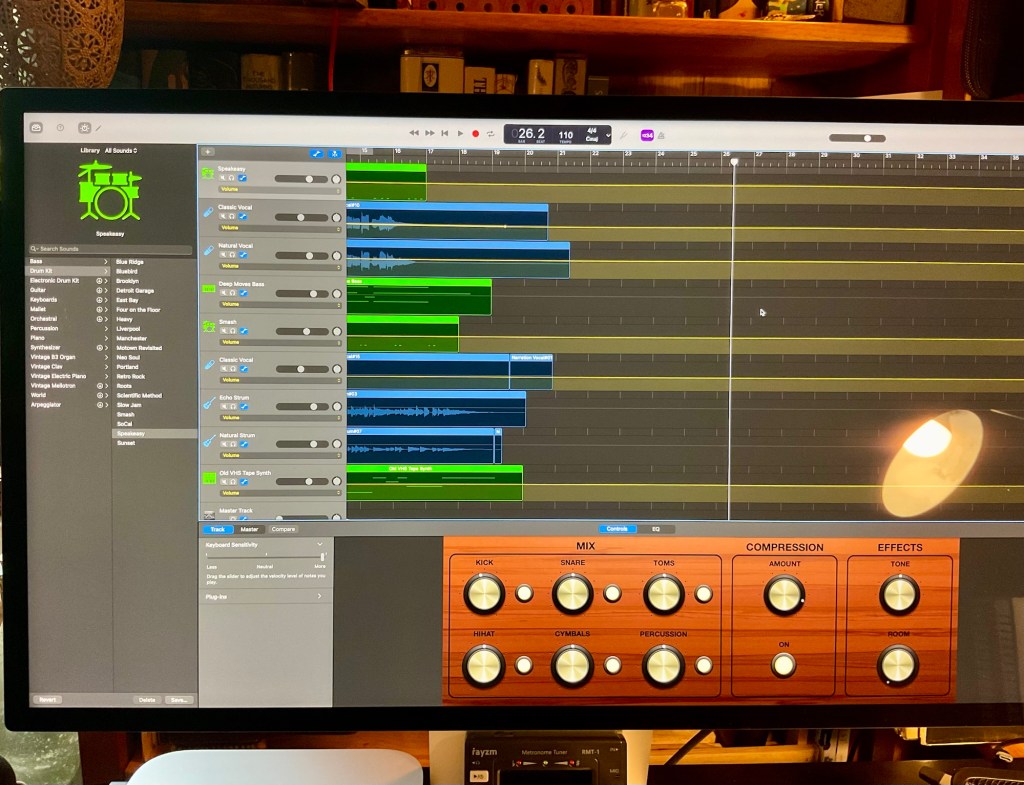
The starting point of the glorious mess. Just a few synthesiser sounds, hand claps and finger snaps. Gets a bit overcrowded on the second one below.
Even though GarageBand isn’t AI at the level we believe it can achieve now. It still has to have tactile skills. It gives opportunity to replace a real brass TRUMPET with a synthetic trumpet. Breath control into the mouthpiece and three fingers in action for hitting multiple notes is far above the skills of me pressing a keyboard note to produce a brass ensemble. This is why I really don’t want to go down the rabbit hole of what the Apple Mac home recording system and the GarageBand or Logic Pro apps can offer. I am using what it offers to get insights as to what songs could sound like. But recording real musicians is where it can really capture decent sound results.
So yes, I do play bass, electric and acoustic six strings, sing and intend to record percussion and other instruments if I feel I can give some justice to the results. All into microphones too.
Above? The preference of headphones were used on the recording. I may get some decent speakers soon for listening to recording on the Akai midi system. It records directly into the computer so outside noise doesn’t affect the recording. But not when recording individual instruments and vocals on external microphones and amplifiers. Then of course the speakers as external noise aren’t compatible.
This above audio called ‘Chaos to Drums to Chaos’ is what happens when I mix playing my Fender Jazz Bass guitar, three six string electric guitars and then go ‘layering’ mad by using the Akai midi keyboard system and subsequently choosing many various instruments and percussion sounds from the GarageBand library. Start pressing the piano keys to make a little melodies of synthesised sound, finger snaps and hand claps over a 16 bar loop. Same repetitive groove. Over and over and over. Then choose one of the GarageBand drummers from the list of many and tweak the rhythms too. Result? In the wrong hands, aka Summers? A glorious chaotic mess evolves.
It was fun though.
 Gray Summers
OMG, Gray… I was just telling my daughter that you suggested I dig into learning GarageBand and that I thought it would enable me to use one of Richard’s instrumental tracks, add in some bits of other song samples, and then layer in my voice and new lyrics, and here you are explaining all this! Ha! And I am smiling so big because your wife didn’t know you were playing the keyboard!! I must admit playing the midi seems like how one could play an organ using one or two fingers and all those special keys to sort of create a song back in the day—and yet not really know how to play piano. I recall a commercial where the gentleman selling organs used to do that and make it seem so easy!
Also, some friends have never known my husband plays guitar and bass even after writing hundreds of songs!
I guess there are lots of ways to create songs. Gosh!
Well, keep going. I think your mish-mosh, or chaos, is churning out some interesting patterns, rhythms, and such!
LikeLiked by 1 person
The YouTube video uploads show some good teachers explaining what can be achieved. But not how to use the mouse to click on certain techniques. How to get into specific areas or once found…..get back out again. I was moving individual notes around on tracks and copying and pasting notes in elsewhere as an experiment. It is just mucking about.
The headphone icon on each track to turn on and off depending on if you want hear the instrument can isolate many sounds. You may have 7 instruments recorded and want to listen to only 3. So 4 headphones are turn off. You can balance that way too. I haven’t done this yet, so may try it over the next few weeks. Also, you can create a fade in/out line on either each instrument or the overall main track. So can lower sound at certain places in the ongoing song. That’s why I was just mucking about with a whole load of little melodies. You can see what works with what. Altogether? This glorious mess.
I can’t explain all this easily Sheila. Good to just give it a try. Cheers.
LikeLiked by 1 person
I enjoyed both audio clips, Gray. Great creating!!
I’m glad to know I can lower the sound at certain places of a song, in GB. I could use that when creating songs for my instructional videos! Thank you again.
LikeLiked by 1 person
You’ve given me an idea for explaining more on this by taking close up photos of the computer screen. Like how to get the ‘Fade in/out’ option for tracks. When activated, a horizontal thin line appears through the whole track start to finish. Using the mouse on a certain point, you double click and an isolated dot appears. This dot can be held with the mouse and drags the line up or down. By creating another dot further along the line, you drag that one too. So fade in/out a section of the instrument. Creating a Master track, again a very simple choice to find, it appears at the bottom of the whole layers of tracked. You do the dot scenario on that and fade the whole song volume out slowly. As happens on a fair few of my little music pieces uploaded. These three above for example. Fade in to the song is a possibility too. But I never do that one. A bit too psychedelic for my taste. Cheers Sheila.
LikeLiked by 1 person
Happy to spark a new idea, Gray!
WOW! You sure could write a 101 book on how to handle GB! I know once I dig into it, all your advice will be useful.
It sounds a bit familiar, with movie making software I have used, but it sure is intimidating!
LikeLiked by 1 person
I am 1% knowledgeable re: GB as yet Sheila. It’s endless. Logic Pro is even more complicated. I want to keep it simple really. It’s just that playing continually to the end of a song with red light push the button recording nerves is great if you can slot in a remedy to a few bum notes. Paul Simone’s from the Clash was saying in a recent interview about when on stage with the Gorillaz and live playing after recording studio experience. ‘Yes. But you have to play the song all the way through playing live’. After the luxury of modern recording, I suppose you can change all the mistakes really easily. Play a bar of music, cut it and paste it. Nuts!
LikeLiked by 1 person
Ha! Right, Gray, about the copy and paste stuff going on in the studio work nowadays, not to mention auto tune! Ha! Groups that can play well Live are in demand I think people people catch on to those fakery tricks.
LikeLiked by 1 person
John, our drummer from the Team 23, always bemoans new music. The way it is produced mainly. He has knowledge of recording in the past. He played for the band King. He talks of the process of recording their album and many aspects of how it was achieved. Now. It is not Master tape anymore. Splicing out and cut and paste in. John and myself were speaking yesterday of where the Team 23 live recordings went. One was supporting the band Madness and was recorded on the Rolling Stones mobile unit. Smoke on the water was recorded on it. I think there is still interest in past recordings because the drummer from The Specials took us under his wing. There is a lot of interest in his past interests and back catalogue of Two Tone experiences. Back in the days, I believe musicians had no problems playing live Sheila. We just got on and did it. Had to I suppose. Record companies could be in the audience.
LikeLiked by 1 person
Yes, indeed, Gray. Record label execs used to find new artists by going to concerts, fairs, and festivals. Those were the days!
LikeLiked by 1 person
They certainly were.
LikeLiked by 1 person
a beautiful, joyous, perfectly imperfect human “mess” — that’s what I hear and adore.
LikeLiked by 1 person
It is good to create safe chaos cookie. 😊 Mind you, in the earphones I can hear a fair few bits of tunes getting along with each other really well. It’s the odd synthesised choices that elongate into different note/key spaces (gate crashers) that make this instrumental party more interesting. All the best and cheers.
LikeLike
sorry…had to say lol to that conversation 🤭
cute…
the technical aspects are confusing to me 🥴…I just know I enjoy or I don’t 🤭
safe chaos…as you say to Cookie…much enjoyed I say…
and it did sound fun too…🤍
LikeLiked by 1 person
This layering of this utter nonsense/chaos allows the learning of how the GarageBand system works. I can dip into an individual track, for example a trumpet tune, and mess with the sound re: tone, notes, etc. Learning the technology and then trying to explain is very difficult. I don’t understand most of what I am trying to do either Destiny. 😊 🙏🏽
LikeLiked by 1 person
as long as you enjoy…the understanding part can come later lol…
LikeLiked by 1 person
Too true. Thank you Destiny.
LikeLiked by 1 person