TWO RECENT ACTIVITIES.
Accessing the ‘Site Settings’ on the Jetpack App, the space filled up to yesterday on my blog site was 90% and actually a bit more. So last night I threw lots of Published blogs into Draft status. Actually probably 150 plus and maybe even up to close on 200 exist there now.
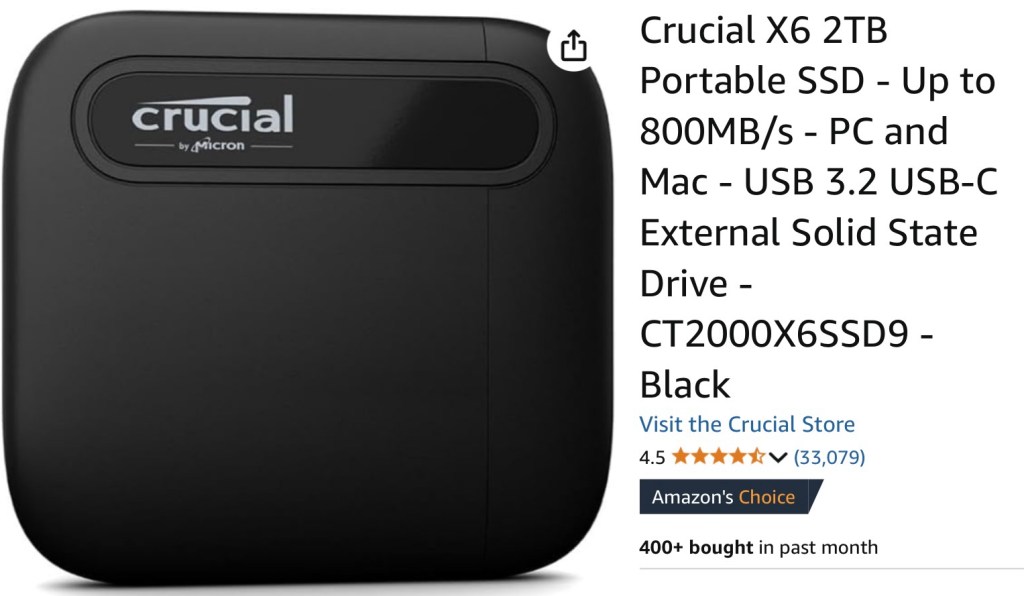
I then got the Crucial external hard drive of 2 Terrabytes content availability and saved hundreds of my songs on Audio and hundreds of Photographs from Images and saved them into a dedicated named ‘Blog Photographs’ file and a ‘Blog Audio’ file.
So over all the years, many, many of audio uploaded songs and photographs taken for the blog now exist in this little external hard drive below. It’s smaller than a credit card. Crazy really how technology has moved so fast. Also, new internet fibre broadband can download each song or photograph in the blink of an eye. My old internet speed? Let’s just say I would be saying hello to Santa Claus by now. On this coming Christmas Eve. Asking him the ‘How do you do it all in one night’ puzzlement question.
As I was doing the shove into draft and downloading from Media files, I was then permanently deleting them from the Jetpack/WP App site. I continued today too. But the reduced % only reduced down to 80%. So I went back into the Drafts and simply removed all the media on each blog post by deleting the audio and some photo uploads. I still have the blogs, so if needed to re-publish them at any time, I can polish them up and upload imagery or songs off the Crucial again.
I have also started replacing my upload to Jetpack/WP videos with YouTube links to the same songs. Then deleting the WP video. They took up a lot of memory bytes. And I have only deleted about a 1/3 of the videos. Now I am down to 60% with still more to do. But a bit tired now. So will carry on over this week.
Warning!!! I am in no way advocating this procedure for others to follow. I can’t say it is full on okay and maybe you may lose posts. I am not deleting Draft status old posts. The comments and exchanges from my friends are in there. Do not want to lose those. I can’t send blogs to a hard drive. So they are essential to keep here in the App. It’s just that the blogs themselves don’t have some photographs or audio in them now. So they look a bit weird. But then ‘weird’ is my middle name.
IN OTHER NEWS?
Just put some new strings onto a charity shop Eko Dreadnought/Jumbo guitar. A nice early 1970s Italian made one. It was battered and bruised when I bought it. So had to do it up a bit. Sounds nice now.
Here’s a quick example of how it sounds. Mind you, with doing this blog clean up, it was a quick rushed affair to get this example done in 5 minutes. Hope you agree though. The guitar does sound nice.

Now all done.


Oh, man… I know how much work this can be. So glad you were able to save off the important stuff (notably audio and images).
Peace, Stan
LikeLiked by 1 person
Cheers Stan. Thanks for your considered thoughts.
It takes hours on hours doesn’t it. There is no way you can assess singly. You just have to save everything to the external hard drive, get loads of blogs into Draft, keep the popular ones you get visits to off Google still Published and fingers crossed, you delete en masse the WP media content after that. Hoping Published blogs have nothing missing!
In some of my thoughts, I wondered whether to begin all over again with a blank canvas. But that wouldn’t work. I have the advert free set up pay system. Not the Professional one. Hence this need for a massive clean out. Once done, blogs will be much less often from now on.
By the way. I logged into Bandcamp and listened to your latest piece. Comments here on WP were closed. So if I can take this opportunity to say …… it was an awesome listen.
All the best Stan. 🙏🏽
LikeLiked by 1 person
Gray, I know how much of a technophobe you are, but back up that solid state drive. If it fails, there are not many options for getting the data back. And the few options there are expensive. Otherwise, excellent idea, I do the same thing for all my pictures, etc. But I back the solid state drive up once a month to stack of hard drives, then I back up the backups. Lose data once and you get very paranoid.
LikeLiked by 1 person
Great advice Danny. Thank you. Still a technophobe ….. but getting a little bit more knowledge into my little grey cells now thankfully.
You have me thinking now what to transfer to. I have a 35 Gb external hard drive too. With the Crucial 2Tb having a USB-C connection and the Intenso with that 35Gb, with a standard USB connector, I have to work out transferring between the two. Probably just easy really with the ‘square with arrow share and send to’ option.
My iPad could have use because I have an Anker 7 in 1 extension port with a USB-C lead as the main input choice. My Mac M2 could do it too as I have a fair few different ports there and can also add the Anker extension. Data transfer is inherent in either. I just don’t want them stored in a main system like iPad or Mac.
I’ve lost written, typed, essays in the past through not ‘saving’. So can understand frustrations.
I’ll have to look into this. Once again. Thanks for the advice Danny. 🙏🏽
LikeLiked by 1 person
I have one of these and a 4 port dock
https://a.co/d/0hpU6Ade
LikeLiked by 1 person
I will look into this Danny. I copy/pasted the name of your machine and looked at the Amazon UK site and saw it with lots of other makes of these all at similar prices. I have no idea at all what it is all about regarding putting hard drives like the ones seen into it. I’ve never seen such hard drive equipment that is ‘docked’ in them in customer photographs.
So, it will be further investigation time. Could be really useful for backing up my GarageBand main songs on the Mac M2.
Thanks Danny.
LikeLiked by 1 person
There are numerous docks that essentially do the same thing. They are super simple to use, you remember 8-tracks! Imagine the hard drive is an 8-track, just plug the hard drive into the dock. Plug the dock into your device and you are done. The iPad or Mac will see the dock as a network/additional drive. You copy files from your device to the hard drives. Super easy.
LikeLiked by 1 person
Okay Danny. I will check out hard drive prices and see if I can stretch to the cost with my meagre pension. 😉
Yes, I do remember 8 track. I have a player and a fair few tapes in the loft. Was thinking about putting it into the VeeDub a few years ago. May still do. Vintage vibe is always a blast.
LikeLiked by 1 person
This never crossed my mind, Gray…that we could run out of space here …🥴..and that we might have to delete stuff to free up space.
I’m sure this is a common thing in technology etc etc…but understanding all this is on an un-common level for some of us…🥴
(I read your comments here 😬 and it confused me even more…🥴lol…)
LikeLiked by 1 person
All I did was, by chance, look at the Site Settings in the App Destiny. At the bottom it has a ‘space used so far’ type % level. Rather like our iPhones/iPads, etc. I put an absolutely massive amount of photos, videos and audio uploads onto my site. So it isn’t surprising I use up space.
Your site should be fine. Not sure which of the WP plans you have. The free one has advertising, so I upped it to the next grade and pay a subscription once a year. A Google site name subscription too. No adverts are in my blogs therefore.
After all your recent problematics with this App, put this space conundrum one firmly out of your mind. I can’t imagine it being the same scenario with your style of content. Far, far different. Your poetry content is wonderful. But a brilliant poem doesn’t use up more space. 😊 Well, maybe does take up more space in people’s hearts.
Cheers Destiny.
LikeLiked by 1 person